
Hyundai Tucson: Traction control system (TCS)
(If installed)
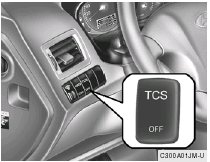
On slippery road surfaces, the traction control system (TCS) limits the drive wheels from spinning excessively, thus helping the car to accelerate. It also helps to provide sufficient driving force and steering performance as the car turns.
SLIP Control
Limits the drive wheels from spinning excessively during starting or while making accelerated turns on slippery roads to avoid losing the driving force of the front wheels.
Driving Hints
TCS does not actively apply brakes. Be sure to decelerate the car sufficiently before entering curves.
CAUTION: When the TCS indicator blinks, SLIP control function has been activated. It also means that the road is slippery or your car is accelerating excessively. In this situation, gently release foot pressure from the accelerator pedal and maintain moderate speed.
WARNING: Traction control is a driving aid; all normal precautions for driving in inclement weather and on slippery driving surfaces should be observed.
TCS ON/OFF Mode
When the TCS is operating, the TCS indicator in the instrument cluster will blink. If you turn the system off by pressing the TCS switch, the TCS-OFF indicator will come on and stay on. In the TCS-OFF mode, the SLIP control will be deactivated. Adjust you driving accordingly. To turn the system back on, press the switch again. The TCS-OFF indicator should go off.
NOTE: 1) The TCS mode will automatically be turned ON after the engine is turned off and restarted. 2) When the traction control system is operating properly, you can feel a slight pulsation in the vehicle. This is only the effect of brake control and indicates nothing unusual. 3) When the engine starts, a click may be heard from the engine compartment; this is the sound of the traction control being checked. 4) When moving out of the mud or fresh snow, pressing the accelerator pedal may not cause the engine speed to increase due to TCS operation.
Indicators and Warning
The indicators should illuminate when the ignition key is turned to ON or START but should go out after approximately three seconds. If the indicators do not illuminate, or the TCS or TCS-OFF indicator does not go out after 3 seconds, have the system checked by an authorized dealer. Should there be any unusual conditions in the TCS System while driving, TCS-OFF indicator illuminates as a warning. If TCS-OFF indicator illuminates, pull your car to a safe place and stop the engine. Then, start the engine again to check if the TCSOFF indicator goes out. If the indicator remains lit even after the engine has been started, have your car checked by an authorized Hyundai dealer.
NOTE: When the TCS-OFF indicator illuminates, traction control is automatically deactivated.
 Operating the automatic transaxle
See also:
Reversing sensor system*
This system operates when you are backing the vehicle. It uses corner and back
sensors to detect an obstacle and sounds a buzzer to inform you of the approximate
distance to the obstacle.
CAUTION:
● The reversing sensor system assists yo ...
Ignition switch
- Never turn the ignition switch to
“LOCK” while the vehicle is
being driven or towed because
that will lock the steering wheel,
preventing steering control. And
when the engine is turned off, it
takes a much greater effort than
...


